

Google Analytics isn’t a UTM platform the same way Google Ads or TikTok Ads is — it doesn’t send UTM parameters in click URLs. It receives them. Every utm_ parameter in this catalog ultimately exists for one reason: to be read, parsed, and reported by an analytics tool. Historically, that tool has been GA.
That history goes back further than most marketers realise. UTM is short for Urchin Tracking Module, named after Urchin Software, the analytics company Google acquired in 2005 for around $30 million. By November 14, 2005, Google had rebranded Urchin’s cloud product as Google Analytics, and the parameter names — utm_source, utm_medium, utm_campaign, utm_term, utm_content — carried over verbatim. Twenty-one years later, every ad platform in the world is still feeding URLs that conform to a naming convention from a 1990s-era analytics startup.
There is one difference between winners and losers when it comes to web analytics. Winners, well before they think data or tool, have a well structured Digital Marketing & Measurement Model. Losers don’t.
This page is the canonical reference for how those parameters are read, grouped, and reported in GA4. The other platform pages on utm.new explain how to produce the right UTMs for their respective ad systems. This page explains what happens after the click — and what GA4 can do with that data once it lands.
The nine official UTM parameters
Most third-party UTM articles list five or six parameters. Google’s own URL builders documentation lists nine.
| Parameter | What it sets in GA4 | Reported today? |
|---|---|---|
utm_source | Source dimension (e.g. google, newsletter4) | Yes |
utm_medium | Medium dimension (e.g. cpc, email, social) | Yes |
utm_campaign | Campaign dimension | Yes |
utm_term | Manual term — typically a paid keyword | Yes |
utm_content | Manual ad content — used to differentiate creatives or links within a campaign | Yes |
utm_id | Campaign ID dimension. Used to link cost-data imports to session data | Yes (cost-data linkage) |
utm_source_platform | The platform responsible for directing traffic to a given Analytics property | Yes |
utm_creative_format | The type of creative | Not currently reported in GA |
utm_marketing_tactic | The targeting criteria applied to the campaign | Not currently reported in GA |
The bottom two are the interesting ones. Google has reserved the parameter names in their official URL-builder spec but explicitly notes that neither currently surfaces in any standard GA report. Best read as a forward-looking signal: Google is preparing for a more granular campaign-reporting taxonomy, but until those dimensions ship, the parameters are inert. Nothing breaks if you set them; nothing is gained either.
Where the parameters surface
GA4 splits campaign reporting across two views with subtly different meanings:
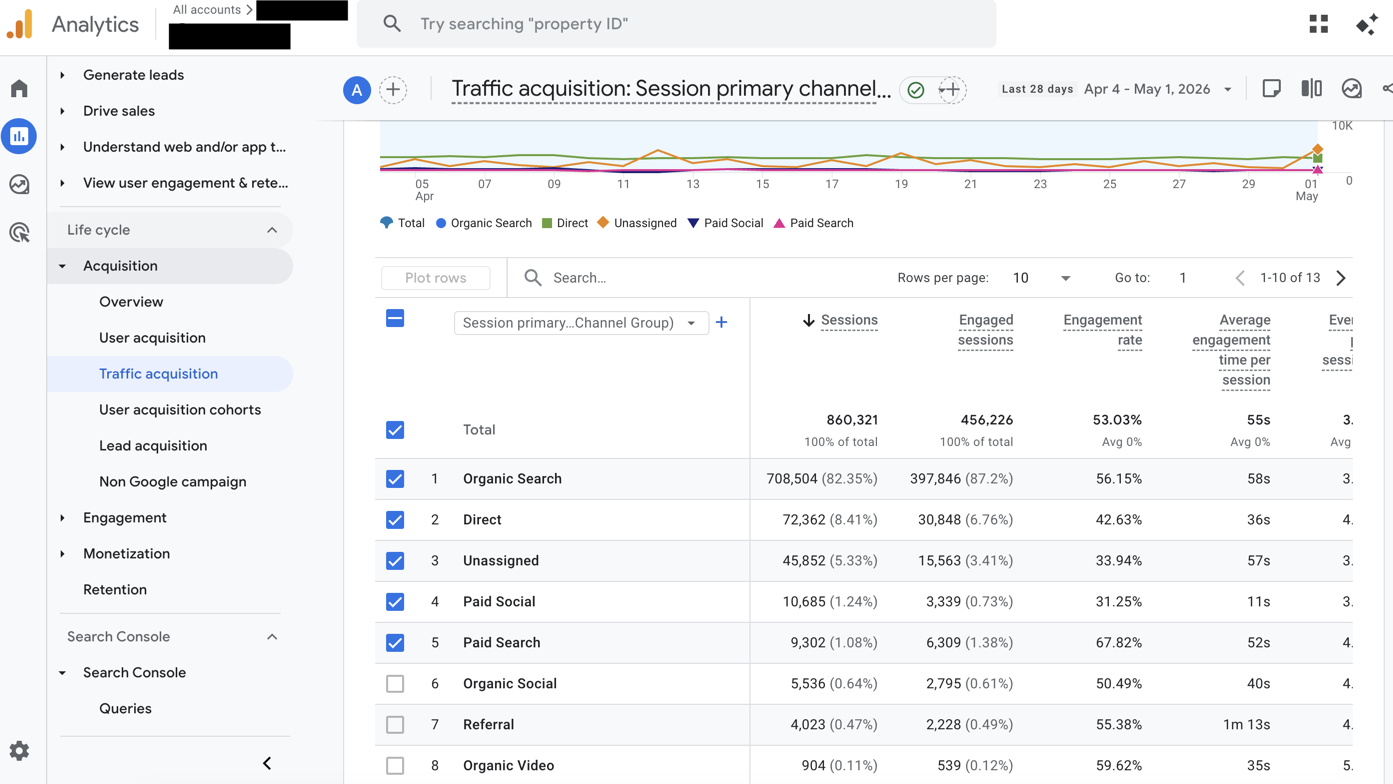
- Traffic acquisition uses the session-scoped source/medium — where the user came from on this particular visit. This is the report most marketers think of when they say “did my campaign drive traffic.”
- User acquisition uses the first-touch source/medium — where the user came from when they first hit the site, regardless of how many times they’ve returned since.
- Realtime shows source/medium live as the session is happening — the fastest way to confirm UTMs are landing on a fresh URL. Covered under Verification below.
Both Traffic and User acquisition read the same utm_* fields. They just freeze them at different points in the user lifecycle. A user who first arrived via your email/newsletter campaign and returned today via a cpc/google ad will appear under Email in User acquisition and Paid Search in Traffic acquisition.
The Realtime report shows source/medium live, which is how you confirm UTMs are actually landing on a fresh URL — covered under Verification below.
How GA4 receives the data: the Google Tag
The utm_* parameters on a URL only become useful once a tag on the landing page reads them and ships them to GA4. In modern Google deployments that tag is the Google tag (also written as the gtag.js snippet in source code).
Per Google’s official documentation:
“The Google tag is a single tag you can add to your website to use Google measurement and advertising products like Google Ads, Google Analytics, Campaign Manager, Display & Video 360, and Search Ads 360.”
That single-tag, multiple-destinations design has three implications worth understanding:
- One snippet feeds many products. When a user lands on your page with a tagged URL, the Google tag captures the
utm_*parameters once and forwards them to every linked destination. Add Google Ads conversion tracking later and it consumes the same UTMs without re-instrumentation. - GTM and gtag.js coexist. Google Tag Manager is a tag-management layer; the Google tag is what actually fires under it. If you deploy Google Ads or Floodlight tags through GTM, GTM auto-loads the Google tag library on your page even if you didn’t add it manually. A site using GTM doesn’t need a separate gtag.js snippet for GA4 — GA4 can be configured as a destination on the Google tag GTM creates.
- Auto-tagging happens here. The “Google Ads auto-tagging” feature that appends
gclidto outbound ad clicks is an opt-in setting on the Google tag’s connected Google Ads account, not a separate script. Removing the Google tag removes the GCLID handling along with everything else.
Default channel grouping
This is the rules engine that turns raw utm_source/utm_medium strings into the channel buckets you see in reports — Paid Search, Organic Social, Email, and so on. The rules are fixed and global; they’re not configurable at the property level (you can build Custom channel groups, but the Default group is owned by Google).
The channels and their qualification rules, per Google’s official documentation:
| Channel | Rule |
|---|---|
| Direct | Source = (direct) AND Medium = (not set) or (none) |
| Cross-network | Campaign name contains cross-network |
| Paid Search | Source matches search-site list AND Medium matches ^(.*cp.*|ppc|retargeting|paid.*)$ |
| Paid Social | Source matches social-site regex AND Medium matches the paid regex above |
| Paid Video | Source matches video-site list AND Medium matches the paid regex |
| Paid Shopping | Source matches shopping-site list OR Campaign matches ^(.*((^[a-df-z]|^)shop|shopping).*)$ AND Medium matches paid regex |
| Display | Medium ∈ display, banner, expandable, interstitial, cpm |
| Organic Search | Source matches search-site list OR Medium = organic |
| Organic Social | Source matches social regex OR Medium ∈ social, social-network, social-media, sm, social network, social media |
| Organic Video | Source matches video-site list OR Medium matches ^(.*video.*)$ |
| Organic Shopping | Source matches shopping-site list OR Campaign matches shopping regex |
Source OR Medium matches email|e-mail|e_mail|e mail | |
| Affiliates | Medium = affiliate |
| Audio | Medium = audio |
| SMS | Source OR Medium = sms |
| Mobile Push Notifications | Medium ends with push OR contains mobile/notification, OR Source = firebase |
| Referral | Medium ∈ referral, app, link |
Three things worth noticing in the rules above:
- The “paid” regex is forgiving.
^(.*cp.*|ppc|retargeting|paid.*)$matchescpc,cpm,cpv,ppc,retargeting,paid_social,paid-search, and anything else that containscpor starts withpaid. This is why the conventionutm_medium=cpcworks on Google Ads, Microsoft Ads, Pinterest, and TikTok with the same outcome — they all hit the same regex. - The Email rule is unusually permissive. It matches
email,e-mail,e_mail, ande mail(with a literal space). Most rules in this engine require an exact match; Email is the rare exception that papers over common typos. - Source matters more than most people realise. Many channels (Organic Search, Organic Social, Organic Video, Organic Shopping) qualify if either the source matches a known list or the medium matches a known string. Google maintains a downloadable list of around 820 known sources mapped to their categories —
bing.comis automatically Search,tiktok.comis automatically Social, and so on. You don’t need a perfectutm_mediumif yourutm_sourceis on the list. But you do need both if you want predictable Paid Search vs Organic Search separation, which is the whole point of using UTMs in the first place.
When traffic falls into Unassigned or (Other)
Unassigned= the source/medium combination matched no channel rule. Almost always a typo, an unrecognised source, or a missing medium on a non-Direct hit.(other)= a cardinality-limit aggregation. GA4 caps the number of distinct values per dimension; everything past the cap gets bucketed into(other). This is independent of the channel grouping.
Unassigned is fixable by correcting your tagging. (other) is fixable by reducing the cardinality of your campaign names (don’t include timestamps, don’t append the user’s email, etc.).
GCLID auto-tagging vs manual UTMs
This is the single biggest source of confusion in the GA-meets-Google-Ads relationship.
But there’s a documented fallback that almost no third-party article quotes correctly. From the same help page:
In instances where the GCLID or DCLID cannot be used as intended, if any UTM parameter is present on the URL, Google Analytics will derive all cross-channel traffic source dimension values from UTM parameters, exclusively.
That caveat is why “defensive UTMs” are worth keeping on Google Ads URLs even though Google’s headline advice is to rely on auto-tagging. If a redirect strips the GCLID, an aggressive consent script blocks it, or the URL passes through a tracker that doesn’t preserve the parameter, GA4 won’t fall back to “missing data” — it’ll fall back to whatever UTMs are present. No UTMs means the session lands in (direct)/(none), which is the worst case.
Beyond reports: what GA4 does with the data
UTMs feed dimensions in reports, but the same parameters flow into three downstream systems that turn campaign data into something more actionable than a row in a spreadsheet.
Audiences
Any UTM dimension can be used as an audience-definition condition in Admin → Audiences. A “users who arrived from email/newsletter in the last 30 days” audience takes seconds to build and exports automatically to any linked Google Ads, Display & Video 360, or Search Ads 360 account for re-targeting. Because the audience is rebuilt continuously as new sessions arrive, the export stays fresh without manual sync.
Predictive audiences layer Google’s machine-learning models on top of the same UTM-derived behaviour. Per Google’s documentation, pre-built templates include “Likely 7-day purchasers,” “Predicted 28-day top spenders,” and “Likely 7-day churners.” The eligibility threshold is non-trivial: “In the last 28 days, over a seven-day period, at least 1,000 returning users must have triggered the relevant predictive condition (purchase or churn) and at least 1,000 returning users must not.” Below that bar the templates show as ineligible until traffic catches up.
Demographics and interests
GA4’s demographic reports (age brackets, gender, interest categories like Arts & Entertainment) come from Google Signals — Google associating event data with signed-in users who’ve enabled Ads Personalization. Per Google’s docs, the source is “data from users who sign in to Google. When Google signals data is available, Analytics associates event data it collects from users with the Google accounts of users who are signed in and consented.”
Two practical caveats:
- Google Signals is opt-in at the property level. It doesn’t activate by default — toggle it under
Admin → Data collection. - Identity-protection thresholds suppress small buckets. Google withholds demographic values when the bucket is too small to anonymise. For low-traffic properties or narrow date ranges, you’ll see
(not set)in the gender or age dimension where the underlying count is below the privacy threshold.
Search Console linking
UTMs can’t capture organic-search keyword data — that information lives in Google Search Console, not in the URL the user clicks. Linking GSC to GA4 brings that organic-query layer into Analytics reports, alongside the UTM-derived paid and referral data, in two new reports: Google Organic Search Queries and Google Organic Search Traffic.
- Permissions needed: “To create a link, you need the Editor role on the Google Analytics 4 property, and you need to be a verified owner of the Search Console property.”
- Data retention: “Search Console keeps data for the last 16 months. As a result, reports in Analytics also include a maximum of 16 months of data.”
- One-to-one mapping: A web data stream can be linked to only one Search Console property, and vice versa.
The integration takes 24–48 hours to start populating data. Once live, organic-search performance shows up alongside paid Search and direct traffic in the same Acquisition reports — making side-by-side comparison of branded paid vs branded organic actually possible inside one tool.
Limitations and gotchas
- Case sensitivity is real.
utm_medium=CPCdoes not equalutm_medium=cpcin most reports. The default channel grouping regex is case-insensitive in some places (the source-list match is, the medium regex usually is) but reporting dimensions like Source and Medium preserve the original case. Two campaigns differing only in case will appear as two rows in your reports. Lowercase everywhere is the only safe convention. - Missing
utm_mediumdrops to Direct. If a URL hasutm_source=newsletterbut noutm_medium, the session is classified as(direct)/(none)rather than as Email or Newsletter. Always set source and medium together. - Custom channel groupings are forward-only. If you create a Custom channel group in GA4, it applies from the moment of creation onward — historical data in the existing reports is not retroactively re-classified. This is unlike UA, where Custom Channel Groupings could be applied retroactively.
- The 820-source list is not public-API documented. Google publishes it as a downloadable spreadsheet linked from the Default channel group help page, but the list isn’t versioned and updates without notice. If
bing.comwas on the search list yesterday and gets recategorised tomorrow, your Paid Search numbers shift quietly. - No GA4 dimension exists yet for
utm_creative_formatorutm_marketing_tactic. Setting them today does nothing visible. They are documented, accepted, and silently ignored.
Verification
Before assuming UTMs are landing correctly, prove it. The reliable order:
- Realtime — confirms the URL is reaching GA at all and the parameters parse.
- DebugView — confirms each parameter on the
page_viewevent individually. - Traffic acquisition — confirms the channel grouping after the session has settled (typically 24–48 hours after the click).
Realtime report — Reports → Realtime in GA4. Visit the tagged URL in an incognito window and watch for your session to appear with the expected Source/Medium. If you see (direct)/(none), the parameters aren’t reaching GA. Check for redirects, hash-routing apps that don’t trigger a page_view, or consent-block scripts.
DebugView — Admin → DebugView. Requires GA Debugger Chrome extension or debug_mode enabled in your tag config. Shows individual events as they fire, including the page_view event with its full set of parameters. The page_location parameter on page_view should contain your full URL with all UTMs intact. If the URL in DebugView has UTMs stripped, the issue is upstream of GA — a redirect, consent script, or analytics wrapper is the culprit.
Traffic acquisition + Source/Medium dimension — for any session older than the Realtime window, this is the canonical verification. Set the date range tight, filter by your campaign, and confirm the source/medium and channel match what you expect.
Common problems
- My campaign is showing in
Unassigned. Almost always a typo inutm_medium. Run your medium values through the rules table above. Common offenders:social-paidinstead ofpaid-social,e-mailworks butEmail(capital E) sometimes doesn’t depending on the report. - My Google Ads campaign is showing as
(direct)/(none). GCLID is being stripped before it reaches your landing page. Check for redirects (especially link-shorteners, marketing-automation wrappers, or AMP cache redirects), hash-based routes, or consent-mode scripts blocking the parameter. Add defensive UTMs as a fallback. - My UTMs and Google Ads are reporting different campaign names. Auto-tagging wins by default in GA4. The campaign name you see in your GA4 reports for Google Ads traffic is pulled from the auto-tagged value, not from your
utm_campaign. If you want them to match, either turn off auto-tagging (not recommended) or align your Google Ads campaign names with your UTM scheme. - I added
utm_idand nothing changed in my reports.utm_idpopulates the Campaign ID dimension, which most default reports don’t show. Add it as a secondary dimension in Traffic acquisition, or use it as the join key for ad-cost data import — that’s its primary purpose. - My traffic is in
(other). Cardinality limit. Some campaign-level dimension (most oftenutm_campaignorutm_content) has too many distinct values. Reduce variation — drop timestamps, drop user IDs, drop anything that creates a new unique string per session.